AI Halloween Dance Video from One Photo
Upload one full-length photo. Little white ghosts with pink cheeks pop up beside you, the scene turns into a Halloween street party, and you dance along for 5 seconds. Sample people are AI-generated.
- Sample 1
- Sample 2
Add your photo
Pick quality and length
This video: 5 credits · 20 videos a month for $29.90, or 80 a year for $100
By creating, you confirm you have permission to use these photos. A video that fails is never charged.
No sign-up needed · Pay once, download your video
See a ready-made result instantly. No credits used.
AI Halloween Dance examples: photo in, video out
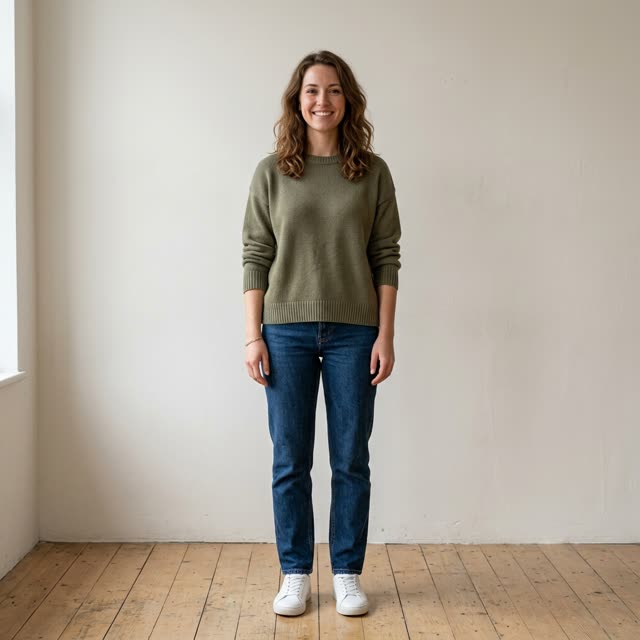 Example photo
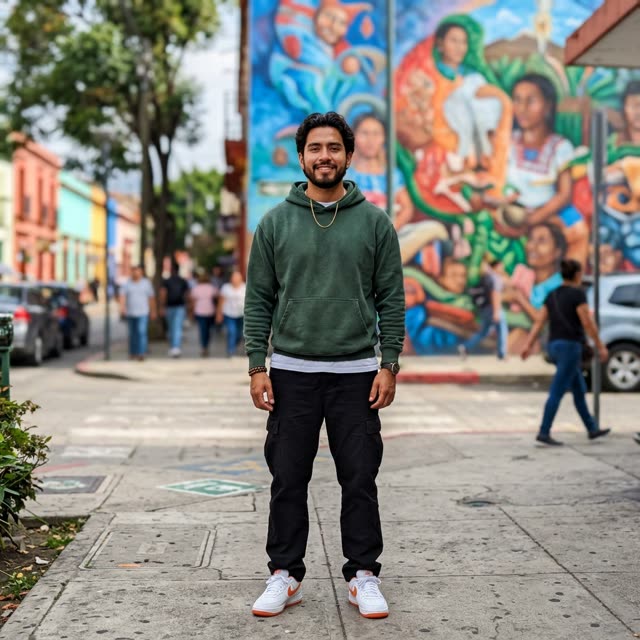 Example photo
How to use AI Halloween Dance
Upload one full-length photo
One person, standing, head to feet in frame. The clip opens on this exact photo before the party begins, so pick one you like. Your own clothes stay on; the effect does not swap them for a costume.
Check the price and length
This effect is set to 5 seconds at 720p, vertical 9:16, on Seedance 2.0 Mini, which costs 5 credits. You can change the length or model in the settings; the new price appears before you pay.
Generate and send it out
Most clips are ready within a few minutes. You can close the page meanwhile. Download from My Works, or from the private link we email to guests, then post it or drop it in the group chat.
Which AI Halloween dance this page makes
Search for "AI Halloween dance" and you will find several different effects: skeletons swinging to "Spooky Scary Skeletons", night-vision ghouls dancing in a backyard, and tools that make you dance alongside ghosts. Among the generator pages that rank for the term, the ghost version comes up most often, so that is what this page renders by default.
Here is what happens in our 5-second clip. It starts on your photo exactly as you uploaded it. Round white cartoon ghosts with rosy cheeks pop into the frame on both sides; you notice them, smile and start an easy, upbeat dance. Then the background turns into a Halloween street party at nightfall: orange and purple pennant bunting overhead, warm string lights, balloons, a little mist, and rows of glowing carved jack-o'-lanterns along the path. The ghosts bounce, spin and copy your moves. It is cute rather than scary, which makes it easy to send to family as well as friends.
What you get for 5 credits
The default render is 5 seconds long, 720p, vertical 9:16, made on Seedance 2.0 Mini, and it costs 5 credits. Our smallest pack is US$9.90 for 10 credits, which covers two of these clips, and you can pay as a guest without creating an account. The clip comes with upbeat Halloween party music generated by the model together with the picture; it is not a particular song. There is no watermark. If a render fails or times out, your credits are refunded automatically, and a photo refused at the safety check costs nothing.
Halloween is on 31 October. Rendering takes minutes, not days, but leave yourself time to try a second photo if the first one is not the look you want.
Photo tips from our test renders
- Full length, standing. Both of our test renders started from head-to-toe photos, and the dancer stays fully in frame the whole time. A waist-up photo forces the model to invent your legs and shoes.
- Your outfit is kept. A sweater and jeans in the photo stay a sweater and jeans at the party. If you want a costume in the clip, upload a photo of yourself already wearing it.
- Any background is fine. One test photo was taken against a bare wall and the other in front of a street mural. In both, the ghosts appear over that first frame and then the street party replaces the background entirely.
- The first moment is your real photo. Because the video grows out of your picture, its first second shows the photo nearly unchanged. Choose one where you are happy with your face and pose.
- One person only. The preset is written for a single dancer. A group photo leaves the model guessing who should dance.
Where an AI Halloween dance fits
A 5-second loop works as a Halloween greeting in a family chat, a reply to party invitations, or a story post on 31 October. Parents use their own photo to make kids laugh, friends send each other's dancing versions as a light prank (with permission), and small shops post one of the team as a seasonal hello. Because the ghosts are friendly cartoons, it suits people who do not like gore.
Ghost dance or skeleton template?
Many Halloween dance effects turn you into something else: a skeleton, a zombie, a figure in a mask. Those can be fun, but the person in the clip stops looking like you after the first second. The ghost dance keeps your own face, hair and clothes for the whole five seconds and adds the Halloween around you instead, which is why people recognize you when you post it. If you want the spooky version, wear the costume in your photo; the model keeps it, and the ghosts still show up to dance.
FAQ
- How do I do the AI Halloween dance with my own photo?
- Upload one full-length photo of yourself on this page and press Generate. The preset already contains the ghosts, the street party and the dance, so you do not write anything. The default clip is 5 seconds at 720p for 5 credits, and it is usually ready in a few minutes.
- Which AI app makes you dance in these videos?
- There is no single app behind these clips; many tools offer dance effects. This page works in your browser, so there is nothing to install: upload a photo, pay for the credits, and download the finished video. The effect here is the ghost dance described above, with cartoon ghosts and a Halloween street party.
- Which photo gives the best AI Halloween dance?
- A sharp, well-lit photo of one person standing, with the whole body from head to feet in frame and the face toward the camera. The clip starts from that photo, so the pose and clothes you upload are what the dancer begins with. A cropped selfie gives the model too little body to animate.
- Can I make a group Halloween dance video?
- This effect takes one photo of one person. We built and tested it as a solo dance, and a group photo leaves the model unsure who should move, so we do not recommend it. For a group, make one clip per person and post them together, or cut them side by side in an editor.
- Is the AI Halloween dance generator free?
- No, every video here is paid. This effect costs 5 credits for the default 5-second clip, and the smallest pack is US$9.90 for 10 credits, enough for two clips. You do not need an account to pay. Failed or timed-out renders are refunded automatically, and refused photos are never charged.
- Does the AI Halloween dance video come with music?
- Yes. The model generates upbeat Halloween party music together with the video, so the clip has sound when you download it. It is not a specific song or a licensed track. If you want a particular sound on TikTok or Reels, you can add it from the app's own library when you post.
- Can I post my Halloween dance to TikTok and Instagram Reels?
- Yes. The video is vertical 9:16, which is the format TikTok, Reels and Shorts expect, so it fills the screen without cropping. Download it from My Works, or from the emailed link if you made it as a guest, and upload it like any other clip. There is no watermark on it.
Make your AI Halloween Dance video
Upload, tap once, and your video is ready in a few minutes.